Применимость
| Модель | Двигатель | Год |
|---|---|---|
| S40 (04-) | — | 2004–2010 |
| V50 | — | 2004–2010 |
Примечание: This accessory is connected to the electrical system of the car. It requires software unique to the car.
- Turn the ignition key to position 0
- Remove the key from the ignition.
Примечание: Wait at least five minutes before disconnecting the connectors or removing other electrical equipment.
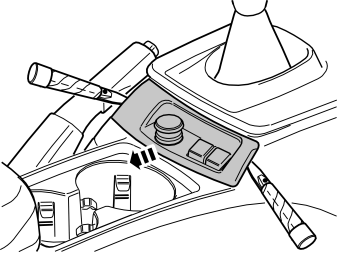
Disconnect the panel at the rear edge of the centre console:
- Carefully pry loose the panel. Use a plastic weatherstrip tool. The panel is secured by a catch on each short side
- Move the panel to the side to access the two screws underneath.
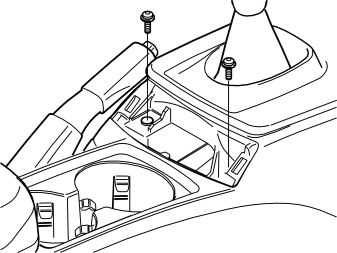
- Remove the two screws holding the centre console at the rear edge.
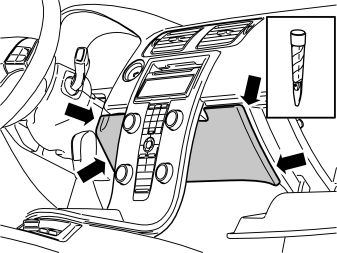
Remove the panel on the reverse of the centre console:
- Open the glove compartment
- Carefully pry loose the panel. Use a plastic weatherstrip tool. The panel is secured by a catch on each long side
- Pull the panel downwards.
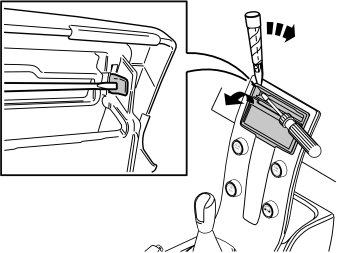
Remove the surround around the display and media player:
- Press in the catch at one of the radio panels upper corners. Use a small screwdriver. Carefully pry off the radio panel on the same side. Use a plastic weatherstrip tool
- Carry out the same procedure on the other side. Then fold the radio panel backwards in the vehicle
- Pull up the radio panel until it detaches.
Подсказка: If there is difficulty removing the panel, press the panel back into place on both sides and start the removal procedure again. Start from the opposite side to before.
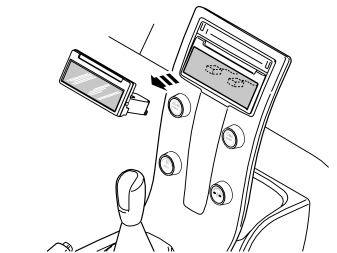
- Press out the display module (1) from the reverse of the centre console. Press straight backwards, using both hands
- Disconnect the two connectors. Place the display to one side.
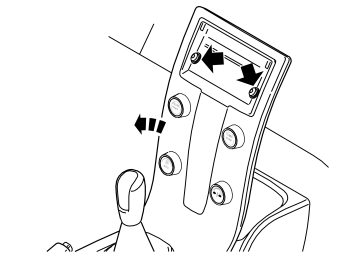
- Remove the two screws securing the centre console at the dashboard
- Remove the connector on the reverse of the dashboard environment panel
- Remove the centre console from the dashboard and tunnel console.
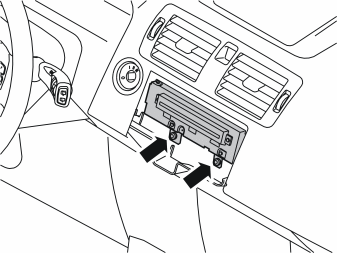
Applies to cars with media players
- Remove the two screws from the bottom of the media player
- Pull out the old media player. Disconnect the connector on the reverse.
Примечание: Note how the wiring is packed on the reverse.
- Put the media player to one side. It will not be reused.
Applies to cars without a media player
- Remove the mounting bracket for the pre-routed cable inside the dashboard.
Applies to all models
- Take the media player and the two screws from the kit (or use the existing screws)
- Connect the pre-routed connector under the dashboard to the media player
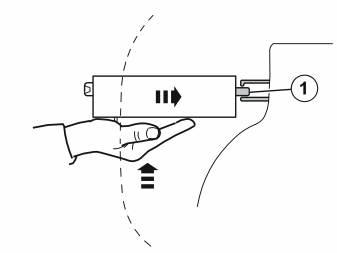
- Position the media player in the dashboard. Guide in the lug (1) at the rear edge of the media player using one hand. The lug must be in the corresponding hole on the reverse of the heater (see illustration B).
Примечание: Ensure that the cable is packed back into its original position. It is a fibre optic cable which must have a radius of at least 25 mm (1”).
- Tighten the media player. Use the two screws.
Reinstall:
- the connector for the dashboard environment panel
- the centre console on the dashboard and tunnel
- the connectors for the display
- the display
- the surround for the display and media player
- the panel on the reverse of the centre console
- the panel on the reverse of the centre console.
- Program the function using VCT2000 in VIDA.